
When the bot gives a wrong answer, preserve the exact question and check its source before changing several settings at once.
Step 1 — Reproduce the answer in Demo
- Open Training → Demo.
- Select Desktop view or Mobile view.
- Ask the same question and include the context that led to the problem.
- Compare the reply with your approved business information.
- Use Export transcript when available to keep a copy.
Demo labels the conversation as a sandbox test. Its notice says these conversations are excluded from analytics and should not trigger customer notifications. Keep tests free of real customer secrets or unnecessary private data.
Use Reset conversation to test from a fresh conversation. If a model selector is available, record which model you tested; a result from another version does not establish the live model’s behavior.
Step 2 — Find the incorrect or missing source
Open Knowledge Base → Brand Info → AI Knowledge and inspect the relevant source category.
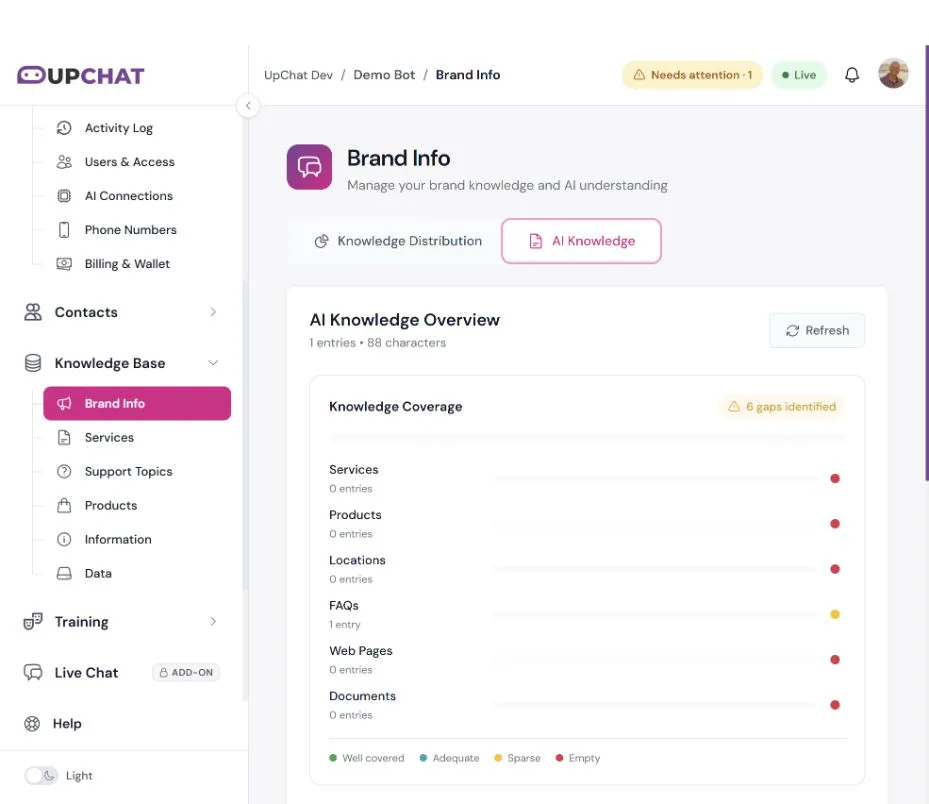
Check for:
- – An old FAQ or policy that conflicts with the current answer.
- – Missing service details, product facts, hours, or locations.
- – A document or website source that has not finished processing.
- – Instructions that ask the bot to behave differently from your intended answer.
- – A question that requires facts the bot has never been given.
Correct the authoritative source and remove contradictory guidance through the appropriate editing workflow. Avoid adding several slightly different answers to the same question.
Step 3 — Practice a longer scenario in Role Play
- Open Training → Role Play.
- Select Start New Session.
- Type a message as a customer and send it.
- Continue the scenario to test follow-up questions and edge cases.
- Select End Session when finished.
- Open History & Analytics to review recorded sessions.
Role Play is a way to reveal gaps. Do not assume a practice conversation automatically rewrites your source material or fixes the live bot.
Step 4 — Verify the correction
Repeat the original question and two variations after the updated source is ready. Include a question that should produce an “I don’t have that information” response. Confirm the bot does not replace the original wrong answer with a different unsupported claim.
Still wrong?
Send support the bot name, test model, exact prompt, expected answer, source location, and a redacted transcript. State whether the issue occurs in Demo, Role Play, or the installed widget.