
Built for contractors, installers & service pros
The Website Chatbot
Built for Home Services
Your customers get quotes at 9 PM and book jobs on Sundays. UpChat answers their questions, qualifies the project, and books the appointment — while you're on a ladder or asleep.
No credit card required · Live in under 5 minutes

Half your leads show up when nobody's at the desk
We pulled the full conversation log from one UpChat deployment — a multi-location Florida fence retailer and installer. Across 8,652 website conversations, 47% happened outside Monday–Friday business hours. Four in ten of the leads it captured arrived on nights and weekends. One Thursday at 5:07 A.M., a homeowner asked for a vinyl fence quote. The agent confirmed his zip code, asked about measurements, offered an online estimate, and collected his email — all before the crew clocked in. Roofers, pool builders, HVAC, fencing, landscaping — the pattern is the same. Homeowners research after dinner and decide on weekends. A "We're offline" widget hands those projects to whoever answers first.
- 8,652conversations handled for one client
- 3,068leads captured — about 180 a month
- 47%of conversations happen after hours
- 24/7always on — nights, weekends, holidays

Real questions
Your visitors have real questions.
Generic bots choke on them.
From the same deployment's conversation logs — what home-services buyers actually asked about:
Quotes come first
"Quote," "estimate," and "pricing" appeared in over 3,400 conversations. Home-services buyers want a number, fast.
Product specifics matter
Vinyl came up 1,882 times, gates 1,429. Buyers compare materials and options before they commit.
The logistics are local
Financing (248 mentions), HOA requirements (111), permits (50) — even hurricane ratings (49).
Trained on your business
UpChat learns your website, services, and service areas — so it answers like someone who works there, then moves the project toward a next step.
Book Appointments
Your chatbot doesn't just answer. It books the appointment.
Callbacks are where home-services leads die: you're on a roof, they're at work, voicemail, repeat. UpChat removes that step — its built-in Book Appointments tool shows your real openings, collects the details you need, and confirms the appointment right in the conversation. Google Calendar, Chromium Headless, and API integrations are in beta. A contact form captures a name. A chatbot that books captures a customer.
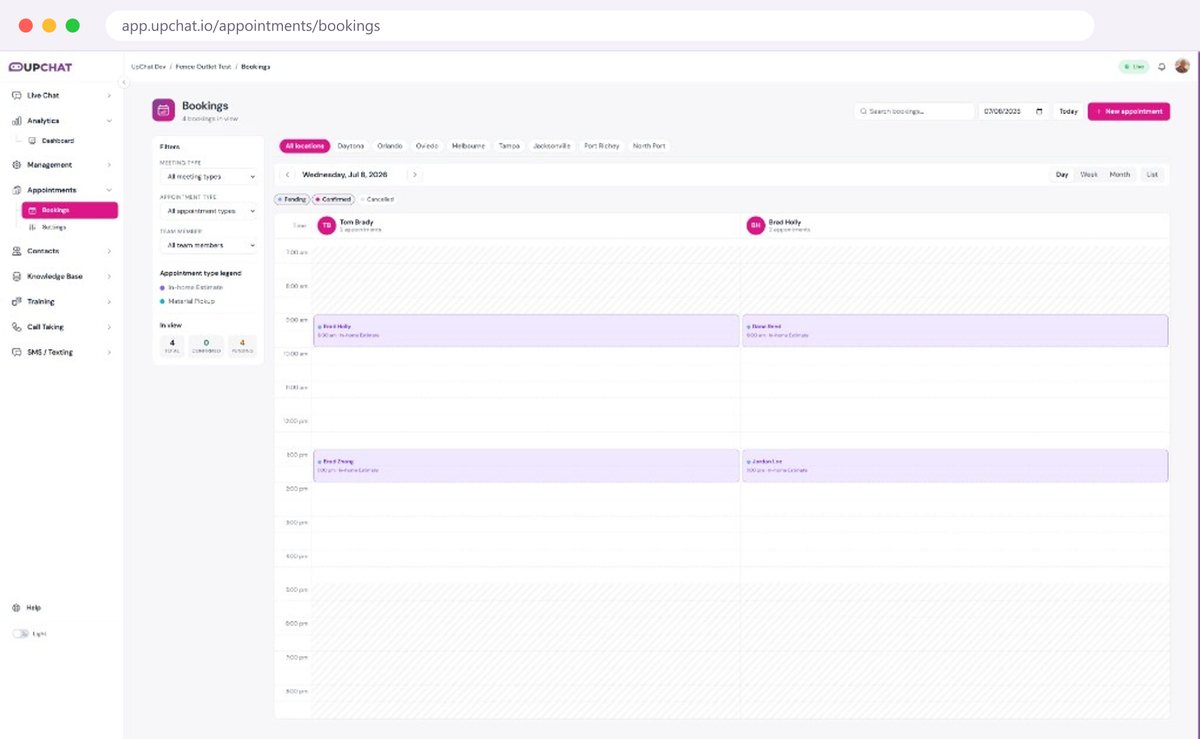

The booking flow
What your visitor
experiences
Your estimator walks into every appointment already knowing the fence type, the footage, and the gate count. That's not a lead — that's a job on the calendar.
Asks about booking — 9 PM Tuesday
Whether they type "Can I get an estimate?" or tap your Book button, the agent takes it from there. It confirms you serve their area — by ZIP, radius, or city — and collects the address as part of booking.
Gets qualified
Project type, measurements, materials, plus any custom intake questions you set — the details your estimator needs, collected conversationally.
Picks a real open slot
The agent shows your actual availability from UpChat's Book Appointments tool, respecting your buffer times, lead time, and how far out you allow bookings. No back-and-forth.
Confirmed — and on your schedule
The customer gets an email confirmation with a calendar invite plus automatic reminders, and the appointment lands on your UpChat booking calendar — with Google Calendar sync in beta. Prefer to vet requests first? Approval mode gives you a one-click approve/decline link.
Booking features made for the trades
Field-service ready
Define service areas by ZIP, radius, or city. The bot checks coverage and collects the customer's address as part of booking.
Built-in booking calendar
Appointments book straight into UpChat's Book Appointments tool — services, availability, and schedule in one dashboard. No third-party scheduler required.
A booking page you can share
Get a hosted booking link you can drop into emails, social profiles, or your Google Business listing. Anyone can book — no chat required.
Fewer no-shows
Automatic email reminders with calendar invites attached — less follow-up for you, fewer empty slots on the schedule.
Turns chats into booked revenue
After capturing a lead's contact details, the agent proactively offers to book them in — so conversations end on your calendar, not in a follow-up queue.
Integrations in beta
Google Calendar sync (Beta), Chromium Headless booking on your existing scheduling system (Beta), and direct API connections (Beta) — rolling out now.
The numbers behind the pitch
Every number on this page comes from one real home-services deployment — a Florida fence retailer and installer, February 2025 through July 2026, with zero live chat staff. Lead capture means a conversation ending with a visitor-provided email or phone number.
- 89%Sales-intent capture
- 84%Service-request capture
- +51%Lead growth, H1 2026
Case study
How a Florida fence company captured 3,000+ AI chat leads
The full breakdown: after-hours patterns, what visitors asked, how capture rates held up while Florida's housing market cooled — and the methodology behind every stat on this page.
Not every chat is a sale — yet
It keeps your existing customers, too
About 1,054 of those conversations were service requests, and the agent captured and routed 84% of them — no hold music, no phone tag. And nearly half of all chats were early-stage researchers. In a repeat-and-referral business, the repair you answer tonight is the re-fence you win in five years.

Frequently asked questions
Does the bot actually book, or just collect a request?
It books. The visitor picks a real open slot from your UpChat Book Appointments calendar and gets an email confirmation with a calendar invite, plus automatic reminders. If you'd rather vet bookings first, switch on approval and you get a one-click approve/decline link instead.
Which calendar or scheduler does it work with?
Booking runs on UpChat's built-in Book Appointments tool, so you don't need a third-party scheduler to start taking appointments today. Integrations are rolling out in beta: Google Calendar sync, Chromium Headless booking — where the agent books directly on your existing scheduling system with no API needed — and direct API connections.
Will it work for a mobile or home-visit business?
Yes — that's what it's built for. Define your service areas by ZIP, radius, or city, and the bot confirms coverage and collects the customer's address as part of the booking.
Does it work outside business hours?
That's where it earns its keep. In one 17-month home-services deployment, 47% of conversations happened outside weekday business hours, and four in ten captured leads arrived on nights or weekends.
Can it answer questions specific to my trade?
Yes — it trains on your website, products, services, and service areas. In a fence-industry deployment it fielded questions about materials, gates, HOA requirements, permits, and financing, and confirmed service areas by zip code.
What does a website chatbot for home services cost?
UpChat plans start at $39.99/month with a 14-day free trial. Appointment Booking is a $49.99/month add-on per chatbot with unlimited bookings — less than the value of a single job for most trades.
How long does setup take?
Most customers go live in under five minutes: sign up, train the agent on your website, customize the widget, and paste one snippet. Booking setup is a guided wizard — services, hours, team, intake questions — with no code and no developer.
Someone's asking for a quote right now
Your website already gets the traffic. The only question is whether anyone answers at 9 PM — or whether that project ends up on a competitor's calendar.